Desktop Computer Accessories
Best Wireless Keyboards for 2024

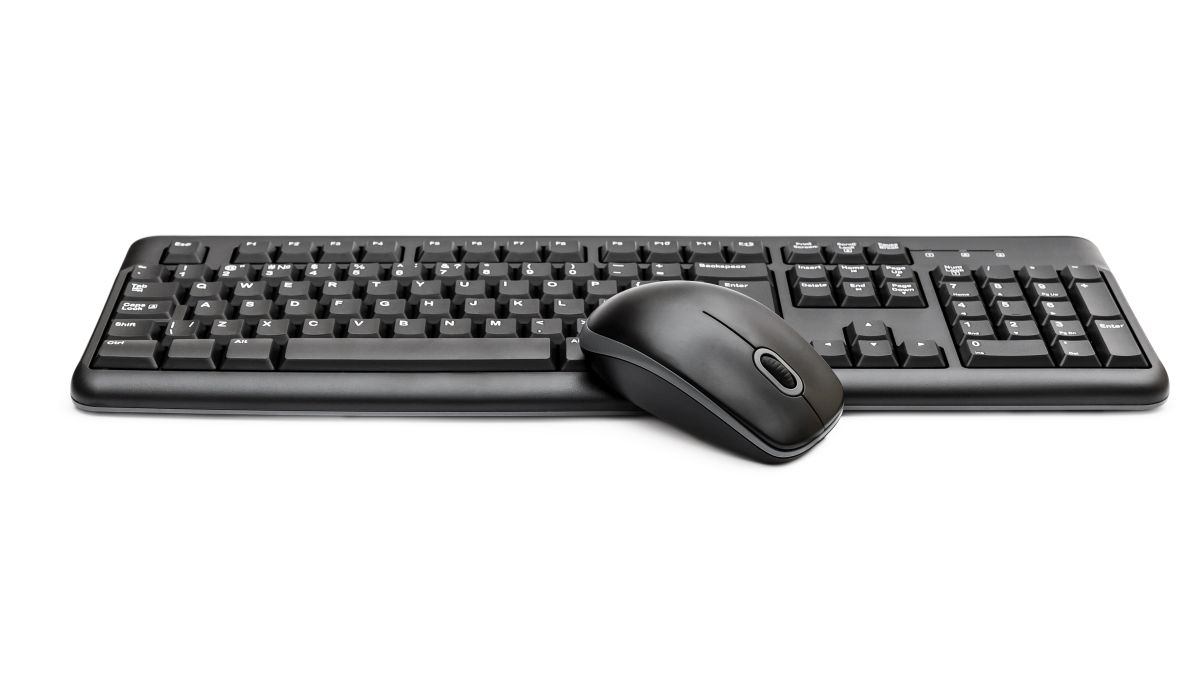
Wireless keyboards have become an essential accessory for both avid and casual computer users, offering the convenience of portability and a clutter-free workspace.
Unlike traditional wired keyboards, wireless variants communicate with your device via Bluetooth or a USB dongle, eliminating the need for direct physical connection.
This flexibility allows you to type from various distances and angles, making it ideal for a multi-device setup or a comfortable living room computing experience.
Choosing the right wireless keyboard can significantly impact your typing efficiency, comfort, and desk aesthetics.
The market offers a plethora of options, from compact, travel-friendly models to full-sized keyboards with ergonomic designs and additional functionality like customizable hotkeys.
When considering a purchase, it’s important to look for reliable connectivity, battery life that suits your usage, key responsiveness, and a layout that matches your preferences.
In addition to these functional aspects, the build quality and material of a keyboard determine its durability and the feel of the keys under your fingers.
Some keyboards come equipped with backlit keys, which can be a boon for working in low-light conditions. Others offer integrated touchpads or numeric keypads, catering to different user needs.
Selecting the best wireless keyboard requires balancing these features against your personal requirements and budget to enhance your computing experience.
With a focus on identifying top performers across various categories, this guide aims to help you choose a keyboard that brings together the right mix of form, function, and comfort.
Top Wireless Keyboards for Effortless Typing
Finding the right wireless keyboard can significantly enhance your computing experience. Whether you’re working from home, gaming, or just looking for a clutter-free desk, a wireless keyboard is a crucial component for your setup.
The best models offer a reliable connection, long battery life, and comfortable typing. Let’s navigate through the top picks to help you choose the perfect wireless keyboard to meet your needs.
KLIM Chroma Wireless Gaming Keyboard

If you’re seeking a vibrant and responsive gaming keyboard, the KLIM Chroma is a solid choice for its wireless convenience and striking aesthetics.
Pros
- Instant wireless connectivity allows for an almost immediate setup.
- The built-in rechargeable battery is both cost-effective and environmentally friendly.
- Vivid rainbow backlighting adds flair to your gaming setup.
Cons
- The non-customizable RGB might not suit everyone’s personal preference.
- Membrane keys may not offer the same tactile feedback as mechanical keys.
- Some users may experience a different typing feel due to the shorter travel distance of the keys.
Upon first use, you’ll notice that the KLIM Chroma’s rainbow backlighting immediately brings a dash of color to your desk.
The wireless functionality is liberating; there’s no fumbling with cables or worrying about port availability. The range is impressive, too, maintaining a reliable connection even when you’re lounging a distance away.
Typing on this keyboard feels light and breezy. The keys are designed to facilitate quick typing, which they achieve, though without the distinct ‘click’ of a mechanical keyboard. Some might miss that tactile response, but for those who prefer a quieter workspace, it’s a welcome feature.
As far as recharging goes, it’s clear that the keyboard’s battery life was engineered with longevity in mind. Not having to replace the batteries is a definite advantage, both for your wallet and the environment.
Overall, the KLIM Chroma makes wireless gaming both convenient and colorful, making it a worthwhile addition to your gaming arsenal.
Trueque Ergo Keyboard

If a comfortable, versatile, and visually appealing keyboard is a priority for you, this Trueque model is well worth considering.
Pros
- Equipped with 7 colorful backlight settings and adjustable brightness for a customized typing experience.
- Features a built-in wrist rest and foldable stand, offering enhanced ergonomics for prolonged use.
- Offers a rechargeable battery with a long lifespan, reducing the need for frequent charging.
Cons
- The provided charging cord may be shorter than ideal for some setups.
- Backlight brightness may not be sufficient for users who prefer a very brightly lit keyboard.
- Some users have reported that key responsiveness may diminish over time, requiring recharging or attention to battery levels.
With the Trueque Ergo Keyboard, you escape the ordinary with its seven switchable backlit colors that transform your desk into an aesthetically pleasing workspace. Its quiet keys allow you to type away without the distracting clatter often associated with traditional keyboards, making it an excellent choice for shared workspaces or night shifts.
The wireless capability offers an unfettered experience, meaning you can position yourself comfortably without being tethered to your desktop. The range and consistent connectivity grant you the freedom to work from your chosen spot without the irritation of dropouts or interference.
Trueque’s inclusion of an ergonomic palm rest and the keyboard’s full-size layout provide you with the support and space needed to tackle your workload without fatigue.
These thoughtful touches make marathon typing sessions much more bearable. Plus, the convenience of the integrated phone holder is great for multitasking.
SABLUTE KN213 PRO Wireless Keyboard

Your typing experience just got a lot more comfortable and visually appealing with the SABLUTE KN213 PRO Wireless Keyboard.
Pros
- Robust wrist support with a sizeable cushion to prevent wrist pain during prolonged use.
- A variety of 7+1 backlight color options for better visibility in dim light settings.
- Integrated device holder supports multitasking effectively by keeping your phone or tablet in view.
Cons
- The automatic sleep mode could be disruptive if you prefer the keyboard to remain active.
- Potential limitation of compatibility with certain devices and operating systems.
- Dedicated device holder may not fit larger or bulkier cases on phones and tablets.
Using the SABLUTE KN213 PRO just now, I immediately noticed the emphasis on comfort. The wrist rest is considerably larger than most, and it certainly adds to the overall comfort, making long sessions of typing more tolerable. You won’t need to worry about wrist strain, which can be a game-changer for those who type extensively.
The backlighting is not only helpful for those late nights when you don’t want to strain your eyes, but it also adds an aesthetic charm to your workspace. The different colors and modes mean you can customize the look to suit your mood or setting.
Lastly, I appreciate the thoughtfulness of the built-in holder for a phone or tablet. This design is particularly handy; you can effectively glance at other devices for notifications or use them as a secondary screen without missing a beat during your workflow.
In conclusion, the SABLUTE KN213 PRO offers a blend of ergonomic features and visually appealing design elements, all while enhancing productivity with its convenient multitasking tool.
It excels in creating a typing environment that feels good on your hands and is easy on the eyes, albeit with a few trade-offs that come with its energy-saving features and device compatibility.
Logitech Wave Keys

You’ll appreciate the Logitech Wave Keys for its comfort-centric design and effortless multi-device connectivity.
Pros
- Ergonomic wave design supports natural hand and wrist position
- Versatile connectivity options with Bluetooth and Logi Bolt Receiver
- Built-in cushioned palm rest for extended comfort
Cons
- May take time to adjust to the wave design
- Lacks the tactile feedback of mechanical keyboards
- Limited to 101 keys, which might not suit users needing a full-size keyboard
After typing on the Logitech Wave Keys, I noticed the immediate comfort from its wavy key layout; my wrists felt naturally positioned, reducing strain during long work sessions. Switching between my laptop, tablet, and smartphone was seamless thanks to the Easy-Switch feature. I relished the quiet and fluid keystrokes, an asset in shared workspaces.
The integrated cushioned palm rest became a mainstay for my desk setup. The memory foam support it offered allowed me to type for hours without any discomfort. Furthermore, customizing the keyboard with the Logi Options+ App provided personalized shortcuts that made my workflow more efficient.
Being environmentally conscious, I appreciated the use of recycled plastics in the construction of the Wave Keys. This gesture toward sustainability is an added bonus for eco-friendly consumers.
Despite its compact form, the keyboard maintained a solid presence on my desk, with no slip, creating a more focused typing experience.
BRJEC Quiet Wireless Keyboard

Experience newfound typing comfort and a clutter-free desk space with the BRJEC Quiet Wireless Keyboard; it simplifies your work with its modern prowess.
Pros
- Ergonomic design enhances typing comfort and desk aesthetics
- Long battery life and auto-sleep function for energy efficiency
- Quiet keys for a disturbance-free environment
Cons
- Not compatible with all shortcuts on Mac
- AAA batteries required but not included
- Some users report high battery consumption over time
The moment your fingers glide over the low-profile keys of the BRJEC Quiet Wireless Keyboard, you instantly appreciate the stability and responsiveness each keystroke brings. Crafted for extended, fatigue-free typing sessions, the full-sized layout, complete with a numeric keypad, facilitates a smoother workflow, whether you’re crunching numbers or composing lengthy reports.
Seamless connectivity is a cornerstone of this keyboard. The unwavering 2.4G wireless connection promises an uninterrupted link to your computer up to 33 feet away.
After an effortless plug-and-play setup, the quiet operation of the crater-structured keys means that late-night work won’t disturb sleeping family members or nearby colleagues.
Durability and convenience come together thanks to the thoughtfully included energy-saving features. The on/off switch and smart sleep mode extend your battery life, ensuring your work goes on without the fret of frequent battery replacements.
Its sleek, modern simplicity aesthetically improves any workspace while the solid build quality reassures that it’s made to last.
EarlyLit Keyboard & Mouse Combo

As someone who values efficiency and comfort in a workspace, you’ll find this EarlyLit Keyboard & Mouse Combo to be a top-notch selection for your computing needs.
Pros
- Streamlined plug-and-play wireless setup enhances mobility
- Quiet mouse clicks and a full-size keyboard layout boost productivity discreetly
- Intelligent power-saving features extend battery life substantially
Cons
- Batteries are not included, requiring an immediate extra purchase
- May not be suitable for high-intensity gaming due to the DPI range
- Exclusive for right or left-handed users; not ambidextrous
Your desk feels surprisingly neat and a breath of fresh air now that you’ve eliminated another pesky wire. The wireless connection hasn’t skipped a beat, ensuring your workflow remains uninterrupted whether you’re lounging on the couch or stationed at your desk.
The satisfying click of the keyboard as you type up reports almost goes unnoticed, a testament to its claim of being whisper-quiet. Shortcut keys are a boon, slashing the time it takes to execute common tasks.
Moving onto the mouse, its sleek form fits snugly in your palm with responsiveness that’s just right for day-to-day tasks. Those who crave silence in their work environment will appreciate it even more for its near-silent clicking. The adjustable DPI settings come in handy when you toggle between precision tasks and general browsing.
Sleep mode kicks in charmingly fast when you step away for a coffee refill, a clever nod to energy efficiency. And once you’re back, a single tap brings everything back to life, ready for action.
Despite being light on the wallet, the quality here feels anything but cheap. Still, you might mentally note that the need to buy batteries can take a bit of the shine off your initial setup excitement.
While gaming enthusiasts might find the mouse lagging in high-stress scenarios, this combo from EarlyLit aligns well with the needs of a standard office, aiding in your quest for a serene and efficient workspace.
Trueque Ergonomic Keyboard
Embrace a comfortable typing experience in low light conditions with the Trueque Ergonomic Keyboard’s customizable backlight and wrist support.
Pros
- Versatile backlighting with adjustable brightness caters to your personal comfort and style.
- Ergonomic design with wrist rest promotes a better typing posture reducing wrist strain.
- Rechargeable battery with long life minimizes the hassle of frequent charging.
Cons
- The charging cord length may limit setup flexibility for some users.
- Backlight brightness may not suffice for individuals requiring intense illumination.
- Occasional customer service engagement might be necessary for troubleshooting.
Having recently put the Trueque Ergonomic Keyboard through its paces, the typing has been notably smooth and whisper-quiet, which could be a game-changer for shared workspaces or night-owls.
It takes the strain off the wrists, thanks to the thoughtful inclusion of a palm rest. Users will find the keyboard’s body sturdy and the keys responsive, much like those of higher-end laptops.
The seven selectable backlight colors allow for a customized, visually pleasing setup that matches your environment or mood. Whether dimming the lights for a movie or working late, these keys remain visible and aesthetically pleasing. And, the charge lasts an impressive duration, making the worry of frequent recharging a thing of the past.
Seamless wireless connectivity means no more fumbling with tangled cables. The keyboard effortlessly pairs with a wide array of devices, leaving your workspace looking clean and organized.
As for compatibility, this keyboard doesn’t discriminate; whether you’re on a Windows PC, MacBook, or even hooking it up to your smart TV, it’s incredibly accommodating.
In conclusion, the Trueque Ergonomic Keyboard is a solid addition to any desk setup. It offers comfort, style, and practicality with a few considerations to note regarding backlight brightness and the length of the charging cord. It promises a significant upgrade from your standard keyboard without breaking the bank.
Buying Guide
Key Features to Consider
When selecting a wireless keyboard, consider the following key features to find one that best meets your needs:
- Connectivity: Look for a keyboard with reliable connectivity options such as Bluetooth or a dedicated USB receiver. Some models offer multi-device pairing, allowing you to switch between different devices easily.
- Battery Life: Battery life can vary significantly from one model to another. Check the expected battery life and whether the keyboard uses replaceable batteries or is rechargeable.
- Layout and Size: Keyboards come in full-size, tenkeyless (without the numeric keypad), and compact layouts. Think about the space on your desk and whether you need a numeric keypad for your tasks.
- Switch Types: The feel of the keys varies depending on the switch type. Membrane switches are quiet and soft, while mechanical switches are tactile and often louder. Some prefer the tactile feedback of mechanical switches for typing accuracy.
- Ergonomics: A good wireless keyboard should be comfortable to use. Look for ergonomic features such as padded wrist rests, adjustable feet, or a split design that can help reduce strain on your wrists and hands.
- Additional Features:
- Backlighting: Ideal for low-light environments, some keyboards offer adjustable backlighting.
- Programmable Keys: For added functionality, consider whether you need programmable keys or dedicated media controls.
- Build Quality: A robust build quality ensures durability and a stable typing platform.
Here’s a quick reference table for your convenience:
| Feature | What to Look For |
|---|---|
| Connectivity | Bluetooth, USB receiver, multi-device pairing |
| Battery Life | Long battery life, rechargeable or replaceable batteries |
| Layout and Size | Full-size, tenkeyless, compact |
| Switch Types | Membrane, mechanical |
| Ergonomics | Padded wrist rests, adjustable feet, split design |
| Additional Features | Backlighting, programmable keys, build quality |
Remember to consider your specific needs and preferences when choosing a wireless keyboard. This will ensure that you select a device that is both comfortable and functional for your daily use.
Author



Password Safe Review: Is This Offline Password Keeper Worth It?

KINESIS Advantage360 Professional Review: The Split Keyboard That Actually Fixed My Wrist Pain

Dell Inspiron 14 2-in-1 Laptop Review: The Versatile Powerhouse That Actually Delivers

UGREEN Revodok 105 USB C Hub Review: The 5-in-1 Solution That Actually Delivers

Desk Lamp with Wireless Charger Review

Ring Indoor Cam Review: Home and Business Security That Actually Works

Runelk iPad Keyboard Case Review: Transform Your iPad Into a Laptop

OWC Thunderbolt 5 Dock Review: A Desk Upgrade That Actually Makes You Faster

CheerDots AI Smart Mouse Review: The Future of Presentation Control

Yubico YubiKey 5C NFC Review

AI-Powered Technology For Better Sleep

AI Translation Glasses Review: Breaking Down Language Barriers

Lenovo ThinkPad E16 Business Laptop Review

HP 2025 17 Inch Laptop Review

Lenovo Ideapad 3 Business Laptop Review

Dell Latitude Laptop Computer 15.6 Review

HP 15.6 Laptop Computer Review For Both Work And Play

Kingston Ironkey Keypad 200 USB Review

Havit HV-F2056 Laptop Cooler Review
